This website uses cookie or similar technologies, to enhance your browsing experience and provide personalised recommendations. By continuing to use our website, you agree to our privacy policy. You can adjust cookie preferences in Cookie Settings.


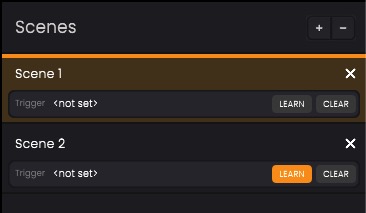
Scenes allow different keyboard mappings and track configurations to be organized into separate performance layouts. Since mappings are scene-specific, switching scenes changes the way Performer Devices interact with MIDI tracks.
This makes it possible to instantly switch between different instrument setups during live performances.
Scenes can be activated by clicking on them directly from the Scenes Panel.
A scene can also be assigned to a keyboard key or MIDI button trigger, allowing scenes to be changed without using the mouse during a performance.
 button.
 or the
  button.
Scene triggers allow scenes to be switched directly from a MIDI keyboard or controller.
 button to start recording a trigger key for the selected scene. The selected key will be assigned as the trigger for that scene.
 button to reset the trigger assignment
Once assigned, pressing the trigger instantly switches to the associated scene.