This website uses cookie or similar technologies, to enhance your browsing experience and provide personalised recommendations. By continuing to use our website, you agree to our privacy policy. You can adjust cookie preferences in Cookie Settings.


Here is further info about a scene:
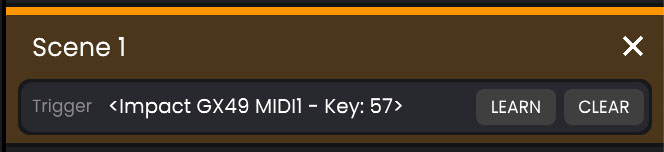
At the top, you find the scene title. By default, it will be named with its sequence. But you can customize it with the title you want by double-clicking it and entering a new caption.
A "x" (Close) button on the right will let you remove the scene.
At the bottom, you'll find a trigger section. This lets you assign a specific key from any of your MIDI controllers to trigger the scene. The process is very simple: click on the LEARN button, then immediately press a key or button on your keyboard. It should get detected, and you'll see it appearing in that section. Next time you press that button or key, you'll see that specific scene being selected automatically.
The CLEAR button lets you remove any previously recorded key.