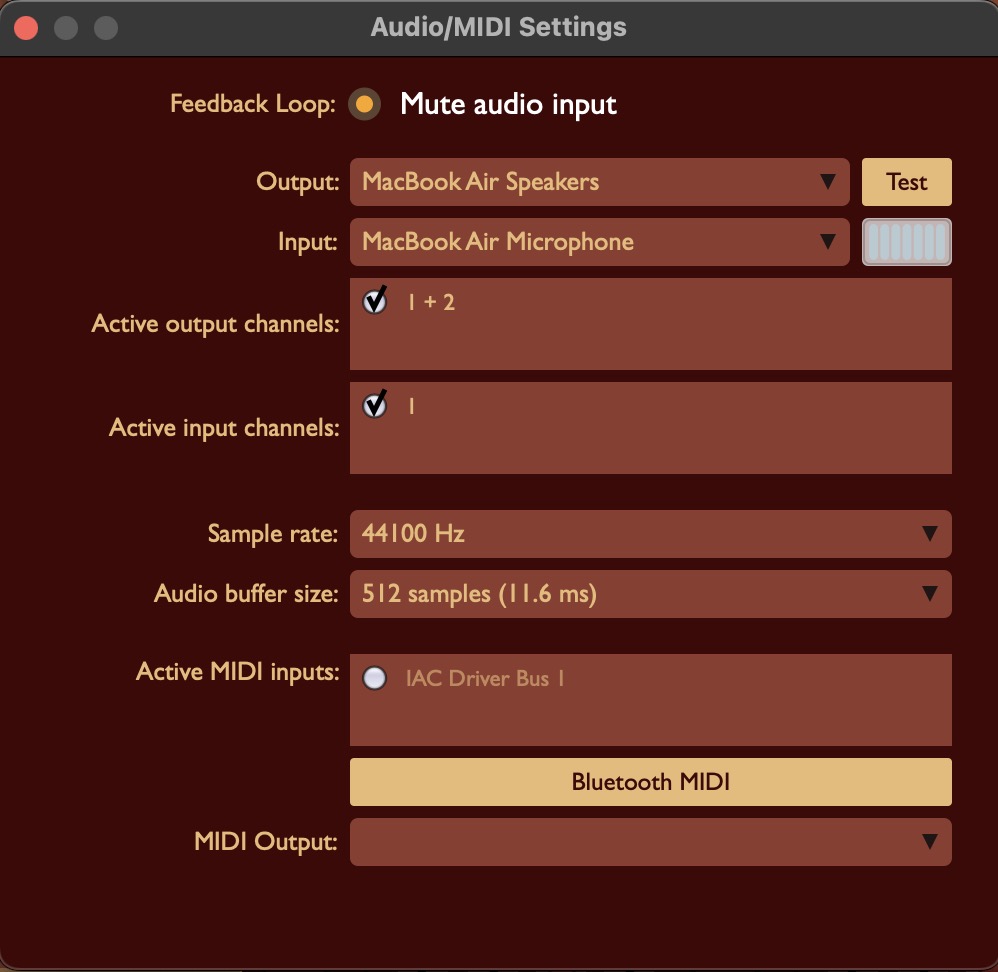
Opens in the standalone app when you click Audio Settings at the top of the Control pane. The button is hidden when SwarGroove runs as a plugin in a DAW, because the host then handles audio and MIDI.
Feedback Loop / Mute audio input: Stops the microphone feeding back through the speakers. Leave this on unless you need live audio input.
Output: Chooses the audio device used for playback.
Test: Plays a short tone so you can confirm sound is coming from the selected output.
Input: Chooses the audio input device. The meter beside it shows incoming level.
Active output channels: Selects which output channels of that device SwarGroove uses (for example 1 + 2 for stereo).
Active input channels: Selects which input channels are used.
Sample rate: Sets the audio sample rate, such as 44100 Hz. Match it to your interface or project.
Audio buffer size: Controls latency. A smaller buffer responds faster but needs more CPU; a larger buffer is more stable if you hear glitches.
Active MIDI inputs: Enables the MIDI keyboards, controllers, or buses that can trigger sequences.
Bluetooth MIDI: Pairs a Bluetooth MIDI controller.
MIDI Output: Sends MIDI from SwarGroove to another device or application, if you need that.
This website uses cookie or similar technologies, to enhance your browsing experience and provide personalised recommendations. By continuing to use our website, you agree to our privacy policy. You can adjust cookie preferences in Cookie Settings.

Cookie settings
You can choose here what
kind of cookies to accept. More information could be found in the
Privacy Policy and Cookie Policy.
Mandatory cookie (always active)
They are necessary to ensure the proper
functioning of the website.
Marketing
Marketing cookies are used to track visitors across websites. The intention is to display ads that are relevant and engaging for the individual user and thereby more valuable for publishers and third party advertisers.
Analytics
Analytics cookies allow us to count visits and traffic sources, so we can measure and improve the performance of our site. They help us know which pages are the most and least popular and see how visitors move around the site.